UPDATE April 4, 2024: The Azure RTOS transition to open-source is now complete and the first release of ThreadX real-time operating system Eclipse ThreadX 6.4.1 now available under MIT license. Learn more.
----------------------------------------------
We’re pleased to share an important update regarding Azure RTOS – an embedded development suite with the ThreadX real-time operating system that has been deployed on more than 12 billion devices worldwide. Reinforcing our commitment to innovation and community collaboration, Azure RTOS will be transitioning to an open-source model under the stewardship of the Eclipse Foundation, a recognized leader in hosting open-source IoT projects.
With Eclipse Foundation as the new home, Azure RTOS becomes Eclipse ThreadX – a comprehensive embedded development suite including a small but powerful real-time operating system that provides reliable, ultra-fast performance for resource-constrained devices. It’s easy-to-use, market proven, and trusted by developers and manufacturers for over two decades. It also supports the most popular 32-bit microcontrollers and embedded development tools so teams can make the most of their existing skills.
”A vendor-neutral Open Source RTOS certified for safety-critical applications and published under a permissive license is an industry game changer and we are excited to help grow the community for ThreadX.” Mike Milinkovich, Executive Director, Eclipse Foundation.
Eclipse ThreadX provides a vendor-neutral, open source, safety certified OS for real-time applications, all under a permissive license. It is the first and only real-time operating system in the market with the blend of all these attributes to address a wide range of industry needs that will benefit both developers and end users. Key benefits include:
- Uninterrupted access: broader and continued access to the ThreadX technology
- Accelerated Innovation: deliver faster updates and improvements via community participation
- Open and Predictable: transparent development process to enhance community collaboration
- Broader Reach: more accessible and versatile for a range of applications
By publishing Eclipse ThreadX as an open-source project, we are placing it at the heart of a vibrant ecosystem led by the Eclipse Foundation and our industry leading partners. The deep expertise in technology, combined with the collaborative spirit of the global developer community, holds vast potential for Eclipse ThreadX to evolve, innovate, and continue shaping the IoT landscape in exciting ways.
“STMicroelectronics is constantly investing in STM32 ecosystem and our collaboration with Eclipse Foundation and the community partners is part of our continuous efforts to bring innovative software solutions to STM32 developers,” said Daniel Colonna, Director General-Purpose MCU Marketing, STMicroelectronics. “We see Eclipse ThreadX and middleware as an important piece of our development environment, which gives STM32 developers a full range of support and choice.”
“The open source model is a powerful enabler for technological advancement. We are thrilled to bring our comprehensive software capabilities and embedded hardware understanding to collaborate on the Eclipse ThreadX project with the community. We are excited to leverage our 20 years of industry experience to enable OEMs to build the next generation of smart, connected devices.” Samir Bounab, CEO, Witekio, an Avnet Company.
“This represents an exciting evolutionally step forward for ThreadX and the embedded industry,” said William Lamie, president of PX5. “This generous contribution by Microsoft makes one of the best commercial RTOS free for all developers to use. We fully support the Eclipse Foundation in this new endeavor.”
“Cypherbridge Systems is excited to join the launch of the Eclipse ThreadX ecosystem. With our extensive experience in delivering our SDKPac (TM) solutions on the ThreadX platform, we are well-positioned to contribute to the project’s long-term evolution under the stewardship of the Eclipse Foundation. We look forward to engaging with new partners and exploring new opportunities with Eclipse ThreadX.” Steve DeLaney, President, Cypherbridge Systems
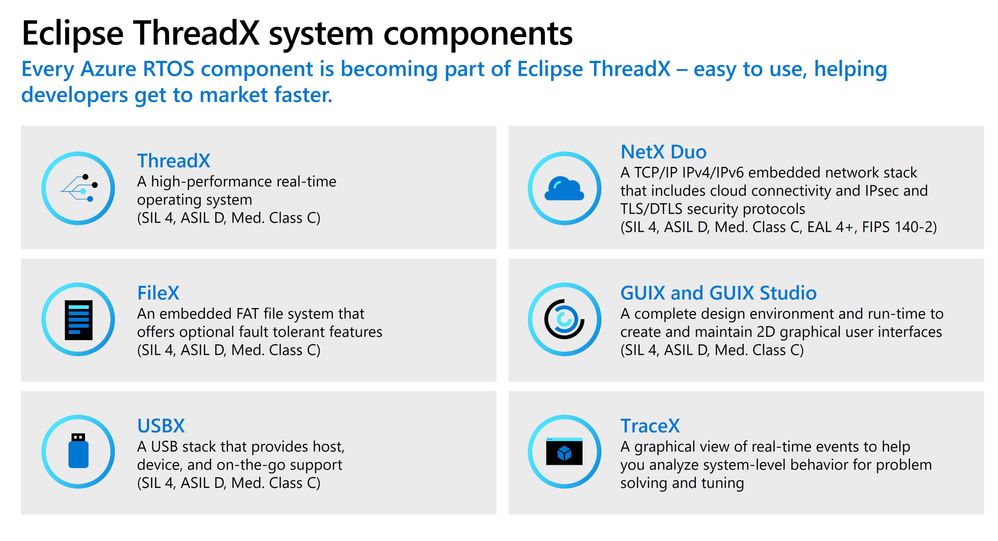
Starting Q1 2024, Eclipse ThreadX project will be available under the MIT license and accessible from Eclipse ThreadX site including ThreadX, NetX Duo, FileX, GUIX, USBX, LevelX and the related tooling and documentation. Microsoft will provide the project with the most recent certifications to enable the continuity of safety and security certified releases.
Learn more at Eclipse ThreadX and read the Eclipse Foundation blog post.